Build a project and inspect the result
Build keeps a generated project’s preview, code, and data beside the conversation. Use it for a small working prototype before moving into a larger development workspace. Access depends on the tools enabled for your account.
Start with a small brief
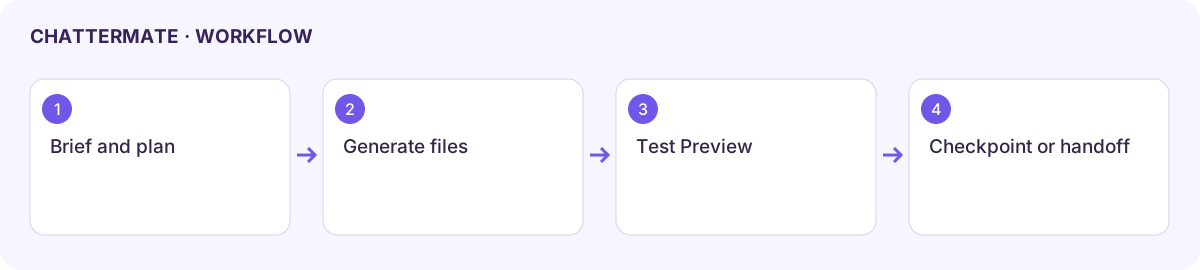
Section titled “Start with a small brief”- Open the available Build workspace or a generated project’s Build panel.
- Describe the people using the app, the main screen, and one task they should complete. For example: “Create a volunteer signup prototype with name, availability, and a confirmation screen. Use sample data.”
- Review the Task Plan when shown. Correct missing requirements before continuing generation.
- Wait for file generation to finish, then open Preview. A visible page is only the start: try the main interaction and check the result.
- Use Code to inspect the implementation and Data to inspect available data controls. Do not assume a sample form has a connected database.
Refine and keep a recovery point
Section titled “Refine and keep a recovery point”Ask for one change at a time, such as clearer form errors. Recheck the affected interaction in Preview. Choose the available Light, Dark, or Both theme option when generating themes.
Open History to inspect checkpoints. Restore only a checkpoint you recognize; restoring can replace newer work. If history says No checkpoints yet, create a recovery point through the available checkpoint controls before relying on undo.
Continue elsewhere
Section titled “Continue elsewhere”Open in Studio opens available design files. Forge or Take to Forge promotes the project into the full workspace; confirm the destination and inspect the transferred files. GitHub requires an authorized connection and repository selection. Check the destination branch and resulting commit before treating a push as complete.
When something fails
Section titled “When something fails”Keep the generation error or preview message with your brief. Retry the affected step rather than recreating the project immediately. A missing Data tab, disconnected GitHub control, or unavailable Forge handoff can reflect access or workspace configuration.
Continue with Design or Forge.
Build preview of the generated volunteer brief beside its conversation.
Workflow at a glance
Section titled “Workflow at a glance”