Create a design and hand it to Build
Design helps you review an application’s structure, screens, navigation, and visual tokens before generating code. Open the available Design workspace; the tabs and generation controls depend on access.
Generate a reviewable design
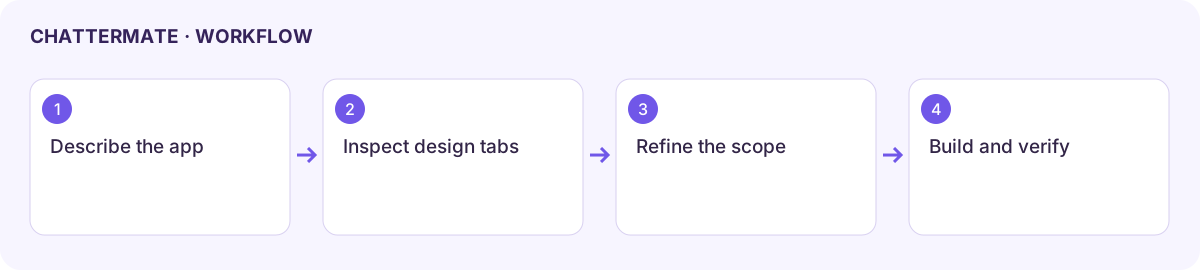
Section titled “Generate a reviewable design”- Choose AI design and describe the audience, screens, and main workflow. Include accessibility needs and the desired visual style.
- Set Scope to Everything for an initial design. Later, target Frames, Flow, Arch, or Tokens to keep a revision focused.
- Generate and inspect the result. In Frames, check screen content; in Flow, follow the user’s journey; in Arch, review the system structure.
- Inspect Tokens for colours, typography, and spacing. Use Studio for the available editing surface. DesignerX has its own planning surface when enabled.
- Ask for a specific revision, such as “Add an empty state to the volunteer list and connect it to signup.” Recheck the screens and navigation together.
Import, export, and version review
Section titled “Import, export, and version review”Import accepts a design specification in JSON. Review the expected frames, tokens, flow, and architecture shape in the dialog; unrelated JSON is not a design specification. Keep a copy of the current design before importing a replacement.
Export offers token outputs including W3C JSON, CSS Variables, and Tailwind Config. Choose the format your implementation needs and open the downloaded file to confirm its contents. These token exports are not the same as exporting a complete working application.
Build the approved design
Section titled “Build the approved design”Choose Build with code when the design is ready. Review the resulting Build workspace, generated files, and Preview. Check that screens, flows, and visual tokens survived the handoff. Use version history where provided before a substantial revision.
If generation stalls, retain the brief and narrow the scope. If a handoff fails, continue from the saved design rather than assuming code was created.
Next: Build.
Design workspace with the generated brief and available design specification.
Workflow at a glance
Section titled “Workflow at a glance”